인터넷 연결없이 로컬에서 AI를 돌려서
언리얼이나 유니티 엔진에서도 사용할 수 있는 모듈을 만들어 보자해서 찾아보게 되었다.
llama.cpp는 Meta사의 LLaMA 모델을 C++로 포팅한 라이브러리다.
llama.cpp는 LLaMA 계열에서 시작했지만,
현재는 GGUF 포맷을 지원하는 다양한 LLM을 추론하는 C/C++ 기반 엔진다.
위 같은 특성때문에 게임 실행파일 안에도 LLM을 포함시키는 구조가 나름 괜찮을 선택이지 않나
생각이 들어서 조금 끄적였던거를 적어 놓아본다.
1. 설치 및 환경 설정
https://github.com/ggml-org/llama.cpp
GitHub - ggml-org/llama.cpp: LLM inference in C/C++
LLM inference in C/C++. Contribute to ggml-org/llama.cpp development by creating an account on GitHub.
github.com
공식 홈페이지에서 코드를 Clone 또는 다운로드 받는다.
예제 파일도 있던데 하나씩 테스트 해보는 것도 좋을듯
2. 사용할 모델 준비하기
LLM 모델을 다운로드 해야한다. 허그페이스에서 받으면 된다.
OpenAI GPT-OSS-20B 위 모델로 받았다가..
호환이 안되는걸 알았다.
https://huggingface.co/openai/gpt-oss-20b
openai/gpt-oss-20b · Hugging Face
We’re on a journey to advance and democratize artificial intelligence through open source and open science.
huggingface.co
내가 설치한 방법은 허그페이스 허브 CLI로 진행했다.
1. pip install -U "huggingface_hub[cli]"
2. huggingface-cli download openai/gpt-oss-20b --include "original/*" --local-dir gpt-oss-20b/
12GB정도 용량을 가졌다.
다운로드를 받았으면 llama.cpp에서 처리할 수 있는 형식인 gguf 또는 ggml으로 변환해야한다.
python convert_hf_to_gguf.py [원본모델폴더] --outtype [quant옵션]

usage: convert_hf_to_gguf.py [-h] [--vocab-only] [--outfile OUTFILE] [--outtype {f32,f16,bf16,q8_0,tq1_0,tq2_0,auto}]
                             [--bigendian] [--use-temp-file] [--no-lazy] [--model-name MODEL_NAME] [--verbose]
                             [--split-max-tensors SPLIT_MAX_TENSORS] [--split-max-size SPLIT_MAX_SIZE] [--dry-run]
                             [--no-tensor-first-split] [--metadata METADATA] [--print-supported-models] [--remote]
                             [--mmproj] [--mistral-format] [--disable-mistral-community-chat-template]
                             [--sentence-transformers-dense-modules]
                             [model]
변환이 되지않는다. 찾아보니 지원되지 않는 형식인 이유는 gpt-oss-20b 모델은
배포될떄부터 양자화 기술이 적용된 채로 업르드 되어서 이걸 변환할 수 없는거 같다.
https://huggingface.co/unsloth/gpt-oss-20b-GGUF
unsloth/gpt-oss-20b-GGUF · Hugging Face
We’re on a journey to advance and democratize artificial intelligence through open source and open science.
huggingface.co
찾아보니 gguf 확장자인 버젼이 있어서 불필요한 변환 과정을 스킵할 수 있었다.
아래는 용량 적은 Qwen으로 재설치했다.
https://huggingface.co/Qwen/Qwen2.5-Coder-1.5B-Instruct-GGUF/tree/main
Qwen/Qwen2.5-Coder-1.5B-Instruct-GGUF at main
We’re on a journey to advance and democratize artificial intelligence through open source and open science.
huggingface.co
3. 실행 테스트
llama.cpp 풀소스에서 Example 폴더에 simple-chat이 있다.
거기서 내 다운로드 받은 모델로 갈아끼어서 테스트 진행했다.
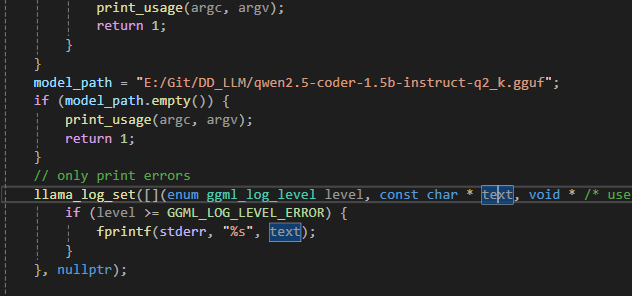

대답은 한 0.5초에서 1.5초 사이로 응답이 오는거 같다.
용량이 작은 만큼 대답이 어느정도까지 나올지는 좀 더 봐야할 것 같다.
그 와중에 Qwen이면 알리바바 소속인데 OpenAI라고 소개했다. 그 뒤로 정정함
'STUDY > C++' 카테고리의 다른 글
| RAII 패턴, 스마트 포인터 (unique_ptr, shared_ptr) 구현 (0) | 2025.12.23 |
|---|---|
| C++로 HashMap 직접 구현해보기 (Chaining + Rehash) (0) | 2025.12.23 |
| C++ - 자동으로 컴파일러가 만들어주는 복사생성자, 복사 대입 연산자 사용 방지법 (0) | 2022.07.28 |
| C++ - 가변 인자 템플릿 (Variadic Template) (0) | 2022.03.21 |
| C++ - 캐스팅(형변환), static_cast, dynamic_cast, const_cast,reinterpret_cast (0) | 2022.03.18 |